Build your training plan fast. Track training as it happens. Be ready for any audit.

A guided starter lays out the curriculum for your state program and generates a task book for every member.

  • Attendance and skill sign-offs take a few taps
  • Every record files itself in one place
  • Report by hours, person, reference code, or skill whenever someone asks

Built for training chiefs, program coordinators, and officers at fire departments and EMS agencies. Guided starters propose a plan for your state program; everything else works from your own requirements.

  1. 1 Plan Start from a guided starter or your own requirements, linked to the codes you follow.
  2. 2 Assign Hand out individual task books by shift, group, or member.
  3. 3 Train & verify Members and evaluators record the sign-offs the plan calls for.
  4. 4 Track See completion by member, shift, requirement, and period.
  5. 5 Report Review coverage and export the evidence as CSV.

Don’t waste time managing training in five places that don’t connect.

Paper task books, spreadsheets, sign-in sheets, an online tracker, and requirements from more than one governing body. Every question about who is current means stitching them together by hand, and that is hours your training officer doesn’t have.

Today Five disconnected places

  • Requirements in a spreadsheet one person maintains
  • Skill evaluations in paper task books, one binder per member
  • Attendance on sign-in sheets and a separate calendar
  • State rules, county protocols, and SOGs in PDFs nobody can find
  • An online tracker, if you have one, that knows nothing about the other four
  • An audit or program review means reconciling all of it by hand

With Rescue Hub One connected place

  • One plan, each requirement linked to the code or standard it comes from
  • A task book per member, generated from the plan, signed off on a phone or laptop
  • Events and attendance tied to the same requirements
  • A Reference Code Library with the code, authority, edition, and source link
  • Progress by member, shift, requirement, and period in one view
  • Requirement, coverage, and skill-evidence reports exported as CSV

Start from your program, not a blank page.

A guided starter proposes the plan and stocks the Reference Code Library for a specific program. Each one comes with a plain-language guide to the rules behind it.

  • Washington Starter available

    Washington OTEP

    Ongoing Training and Evaluation Program · Washington State Department of Health

    EMS agencies and fire departments recertifying providers by the OTEP method

  • Your state or organization

    Don’t see your program?

    Tell us which state program, standard, or agency requirements you track. We are adding starters based on what pilot departments ask for, and the plan, task books, and reports work today from your own requirements.

Plan. Assign. Train and verify. Track. Report.

The examples below use Cedar Valley Fire & Rescue, a fictional department with 12 members across A, B, and C shifts. Screenshots are from a demo organization. Panels marked as illustrations show the pilot feature before general release.

Plan

1Start with a training plan.

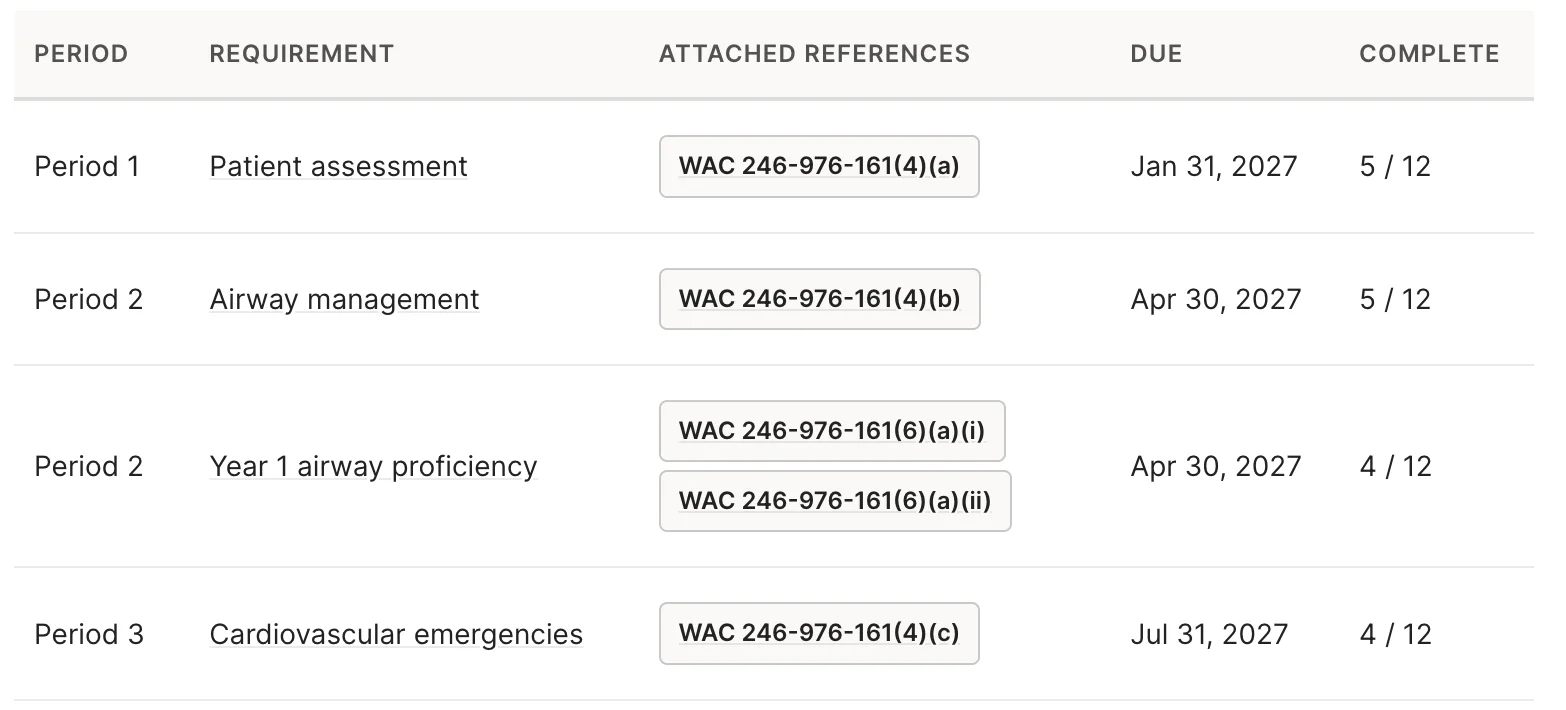
A guided starter proposes a plan for your state program or standard. Pick a start date, a certification level, and the options that apply. Rescue Hub lays out the proposed requirements and training periods for you to review. No starter for your program yet? Build the plan from your own requirements the same way.

  • Periods already in place for the program’s cycle
  • Requirements pre-linked to the code sections they satisfy, down to the subsection
  • Review and change anything before it goes to anyone
Rescue Hub training plan table listing requirements by period, such as Patient assessment and Airway management, each with attached WAC 246-976-161 reference codes, a due date, and members complete out of 12
Product screenshot from a demo organization, using the Washington OTEP starter. Each requirement carries the code subsection it satisfies.
Plan

2Connect requirements to reference codes.

A shared Reference Code Library stores each code, its title, the authority behind it, the edition or effective date, a description, and a link to the source. A starter stocks it with the references it uses, so you are not building the library from scratch. A requirement can link to more than one reference.

  • Keep the citation with the requirement, not in a separate binder
  • Add state rules, county protocols, NFPA standards, or your own SOGs the same way
  • Reports later show which references your plan covers

Illustration, showing Washington references as an example. Confirm each reference against the current code text before you rely on it.

Plan

3Make the plan yours.

Create new requirements or pull in ones you already have. Move things between periods, adjust the training guidance, and add or remove planned requirements. Save a draft and come back to it. Nothing reaches a member until you assign it.

  • Drafts let you work on the plan over several sittings
  • Training guidance is copied into the requirement description and the generated task instructions
  • Existing requirements can be reused instead of recreated

Illustration. Guidance is copied when tasks are generated. Later edits don’t rewrite every copy.

Assign

4Assign task books to groups and individuals.

Select shifts, groups, individual members, or any mix. If someone is picked twice, Rescue Hub consolidates the selection. Choose which permission level can verify skills. Each selected member receives their own task book, organized into periods, categories, and tasks.

  • One assignment covers A, B, and C shifts plus the new hire who isn’t on a shift yet
  • Every task book carries a due date at the end of the plan
  • Qualification warnings flag likely mismatches for the coordinator to review
  • Assigning does not create calendar events or award credit

Illustration. Warnings help a coordinator review the list. They are not credential verification.

Train & verify

5Document and verify skills.

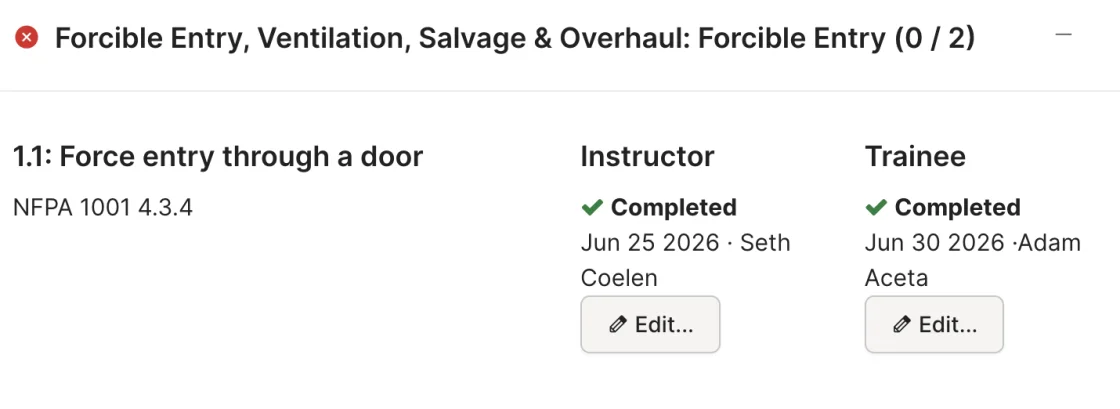
Members and authorized evaluators record the sign-offs each task calls for. When a captain runs a skill station for the whole shift, the sign-off matrix lets them review and sign off the same skill for several members from one screen instead of opening each task book in turn.

  • Member and evaluator sign-offs, each named and timestamped
  • Sign-off matrix for drill-ground evaluations of a whole crew
  • Only the permission level you chose can verify
Rescue Hub task book item showing separate instructor and trainee sign-off columns, each marked completed with a date
Product screenshot: how one sign-off looks inside an individual task book today.
Track

6See progress across the department.

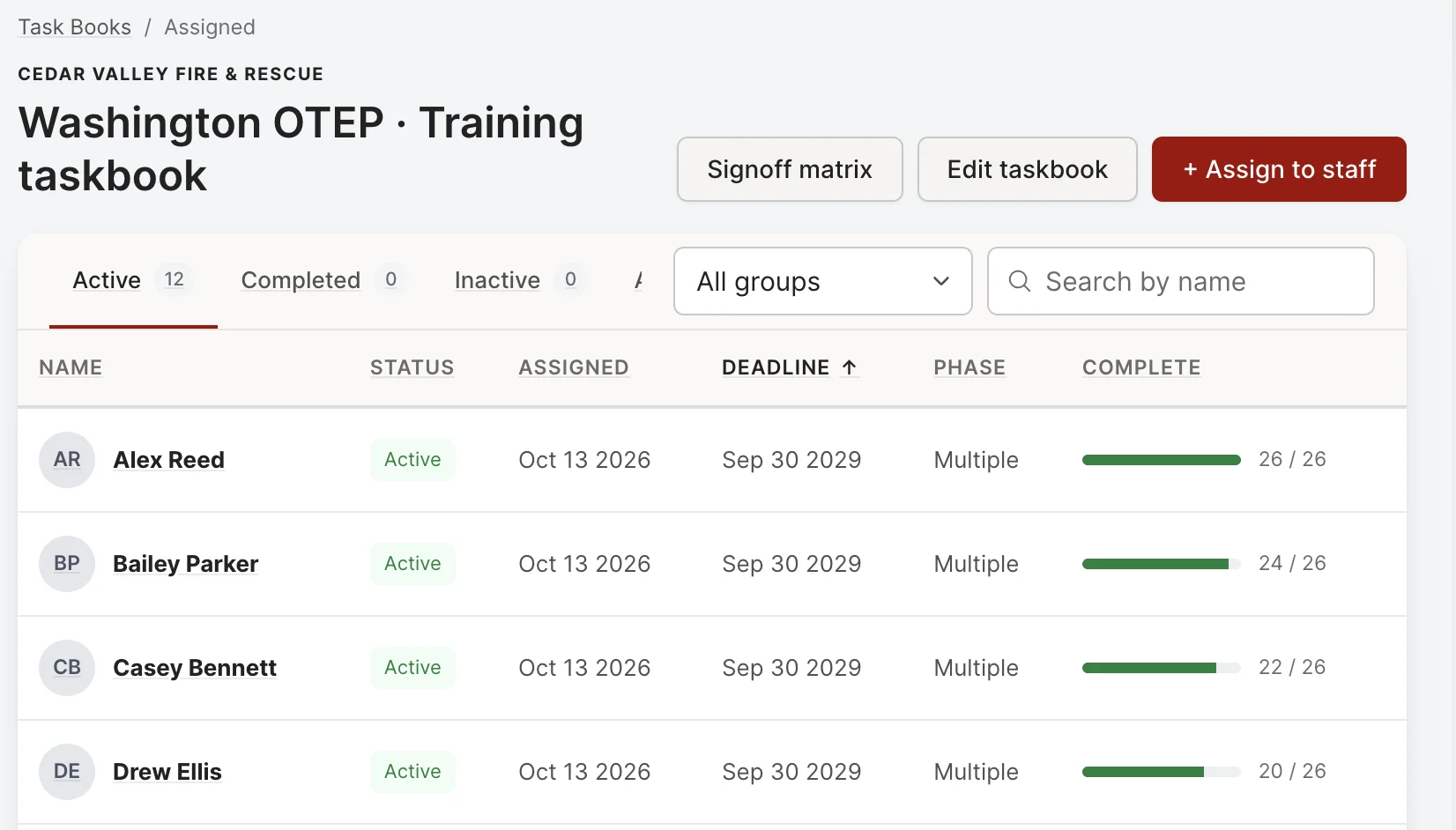
Task book views and the dashboard show completion by member, by group or shift, by requirement, and by training period. An officer can scan a shift and see who is moving and who needs a conversation before the period closes.

  • Every member’s completion bar and deadline on one screen
  • Filter by group or shift, or search a name
  • Shows where things stand today. It does not forecast who will finish.
Rescue Hub task book list for a Washington OTEP training task book at Cedar Valley Fire & Rescue: 12 active members with assigned date, Sep 30 2029 deadline, and a completion bar for each, plus Signoff matrix and Assign to staff buttons
Product screenshot from a demo organization. Cedar Valley Fire & Rescue and its members are fictional.
Track

7Connect attendance and skill evidence.

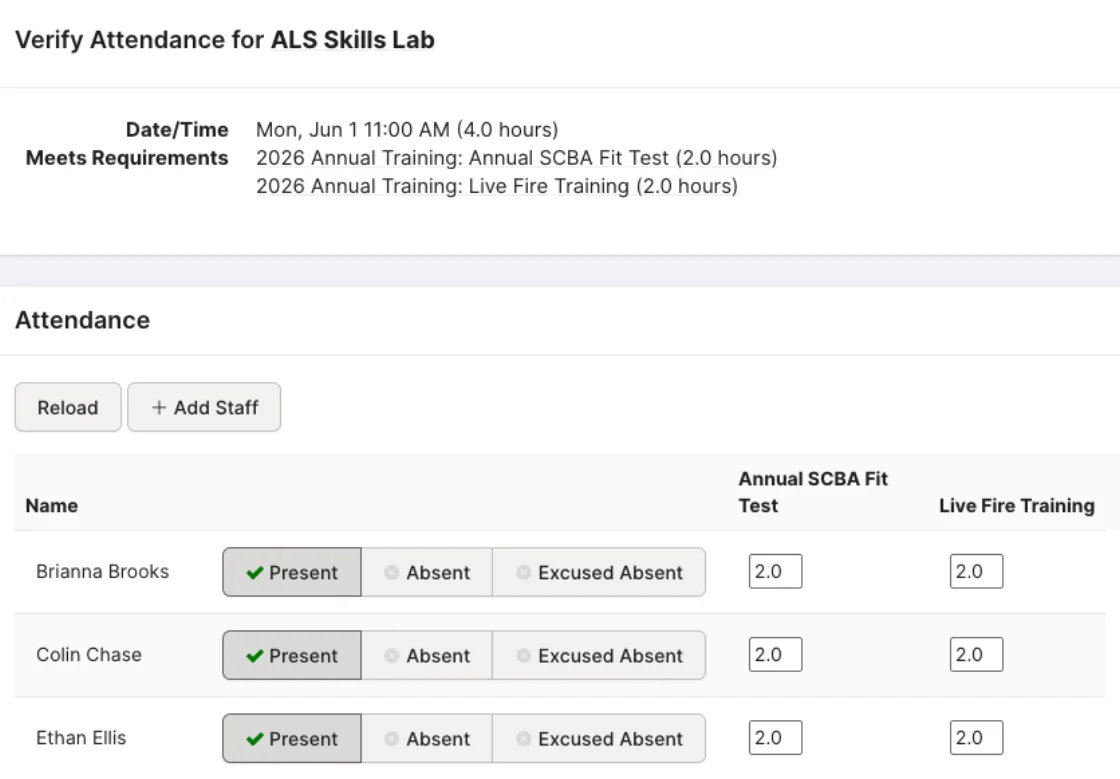
Training events and attendance can be tied to requirements, the same way they are in Rescue Hub today. For program requirements driven by a task book, completion comes from the mapped skill sign-offs. Showing up to the drill is recorded. It does not by itself establish that the member can do the skill.

  • Attendance and hours still flow to the requirement
  • Task book requirements complete when the sign-offs are in
  • Both kinds of evidence sit on the same requirement record
Rescue Hub attendance verification for an ALS Skills Lab event that meets two annual training requirements, with present, absent, and excused options per staff member
Product screenshot: an event mapped to requirements, with attendance recorded per staff member.
Report

8Report and export.

Reports cover requirement progress, reference-code coverage, and task book skill evidence. Export to CSV to prepare records for an internal review, a county EMS office, or an audit, in a format anyone can open.

  • Requirement progress by member, shift, and period
  • Which reference codes the plan covers, and through which requirements
  • Skill evidence with who signed, and when

Illustration. A reference with no requirement pointing at it shows up as a gap in the plan, not a failure.

Six records. One chain.

Each record does one job. The value comes from the links between them.

  1. Reference code

    Identifies the standard or policy. A state code section, an NFPA standard, a county protocol.

  2. Requirement

    What your department expects members to complete. It can link to several reference codes.

  3. Training plan

    Organizes requirements across time, in periods you choose.

  4. Task book

    Tracks one member’s tasks and sign-offs, organized by period and category.

  5. Training event

    Records a scheduled training activity and who attended.

  6. Reports

    Bring the connected records together for review and export.

A useful starting structure. Your department stays in charge.

Rescue Hub gives you a connected place to plan, assign, verify, and report. It does not decide what your members must know or tell anyone you are compliant. We trust departments to manage their own approved procedures, so here is plainly what the feature does and does not do.

  • A starter is a starting point.

    It proposes a plan from the references for that program. It does not reproduce any county’s or agency’s approved curriculum, and you should review every requirement before assigning it.

  • Your department decides what counts.

    Rescue Hub does not approve plans, certify compliance, or recertify anyone. Those decisions stay with your training officer and the authority that governs your program.

  • A plan is not a calendar, and a task book is not credit.

    Creating a plan and assigning task books does not create events or award training hours. You still schedule the training and record attendance.

  • Training guidance is copied, not synced.

    Guidance from the plan is copied into new requirement descriptions and generated task instructions. Later edits do not update every copy, and event descriptions are not filled in automatically.

  • Qualification warnings are prompts, not proof.

    When you assign a task book, warnings help a coordinator catch a likely mismatch. They are not independent verification of anyone’s credentials.

  • Progress views show today, not the future.

    They help officers spot gaps and decide who needs follow-up. They do not predict who will finish on time.

Connected training plans, answered

What is a connected training plan in Rescue Hub?
A plan that organizes your requirements across training periods, where each requirement links to the reference code it comes from, each member gets a task book generated from the plan, sign-offs and attendance flow back to the requirement, and reports read the whole chain. It is an early-access feature.
Which programs have a guided starter?
Today: Washington OTEP. A starter proposes the plan and stocks the Reference Code Library for that program. For any other state program or standard, build the plan from your own requirements and add the references yourself; the task books, tracking, and reports work the same way.
Does Rescue Hub certify that my department is compliant?
No. Rescue Hub gives you a connected place to plan, assign, verify, and report. Whether a plan satisfies a state program or a standard is decided by your department and the authority that approves it.
How does a task book requirement get completed?
For task-book-driven program requirements, completion comes from the mapped skill sign-offs recorded by the member and an authorized evaluator. Attendance at an event is recorded against the requirement, but attendance alone does not establish competency.
What can I export?
Reports cover requirement progress by member, shift, and period, reference-code coverage, and task book skill evidence with evaluator names and dates. Each can be exported as CSV.
How do I get access?
Request a walkthrough. Connected training plans are in pilot with a small group of departments, and we will show you the feature with a starter for your program if one exists, or with your own requirements if not.

Who this is for

Training Chiefs & Program Coordinators

Build the plan once, assign it by shift, and see who needs follow-up without reconciling a spreadsheet against a binder.

Company Officers

Run a skill station and sign off the whole crew from one screen. Every sign-off carries your name and the date.

Firefighters, EMTs & Paramedics

Open your own task book, see what is due this period, and record your part of each sign-off.

Chiefs & EMS Directors

Pull a progress or coverage report and hand over a CSV when the state, the county, or an auditor asks.

Request a walkthrough.

Connected training plans are in early access with a small group of departments. Tell us a little about yours and we’ll set up a walkthrough and talk through whether the pilot is a fit.

Prefer to talk? Call (844) 737-7482 support@rescuehub.com

Product views on these pages come from a demo organization. Cedar Valley Fire & Rescue and its members are fictional. Early-access features may change before general release.